

One on One Calls on Playboy Club give fans a more direct way to connect with their favorite Creators, and give Creators another way to earn through real-time interaction. One on One Calls are private video calls between a Creator and a fan on Playboy Club. They are designed for direct, real-time interaction inside the platform, giving fans a more personal experience and giving Creators another monetization tool beyond posts, messaging, Lives, and gifts. Creators can turn on Video Call Availability, set their own per-minute price, and receive incoming call requests when they are available. Fans can start a call from a Creator’s profile or from the Calls page, review the price, and choose whether to begin.
For Fans: How to Start a One on One Call
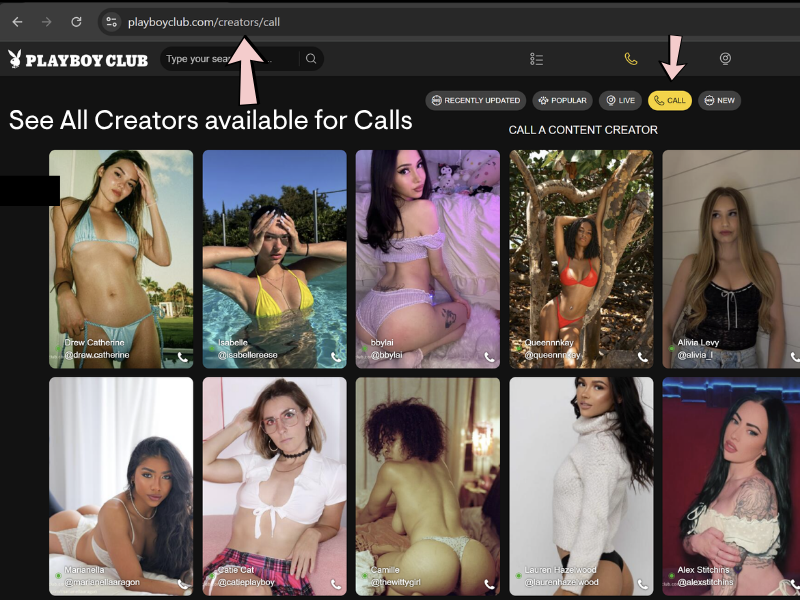
Fans can start a One on One Call with a Creator in two main ways: from the Creator’s profile or from the Calls page. Creators cannot initiate calls with fans.
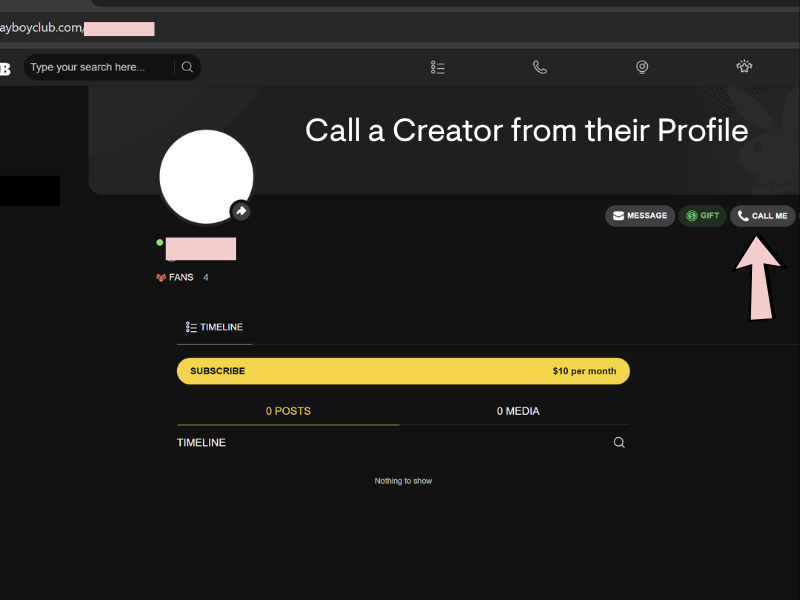
- Go to the Creator’s Playboy Club profile or go to the Calls page to see Creators who are currently available for calls.
- If the Creator is available for calls, you will see a Call Me button on their profile.
- Click Call Me to begin the call process.
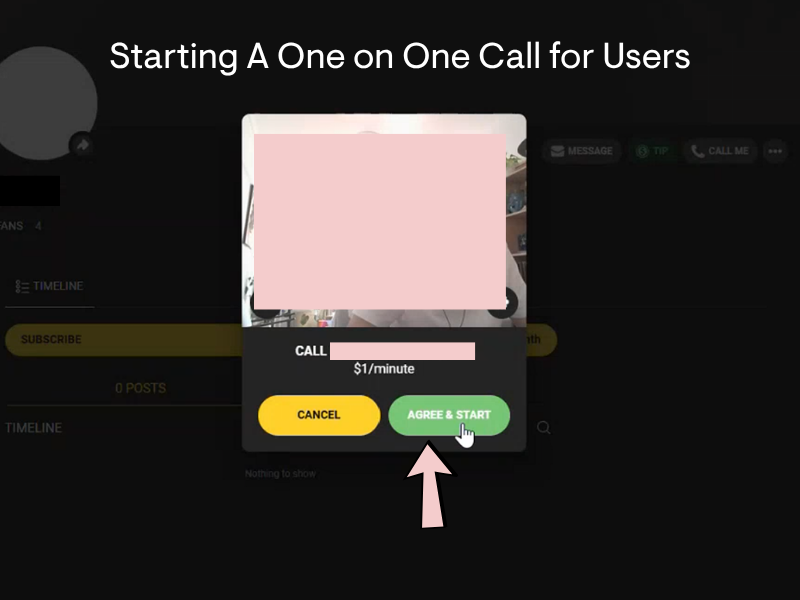
- Before the call begins, Playboy Club will show the Creator’s per-minute call price.
- Review the price, then choose Agree & Start to begin the call.
After you agree to start the call, Playboy Club will connect you with the Creator. Once connected, the call will run in real time. Keep your wallet balance in mind, since One on One Calls are charged by the minute. You will receive a notification before funds run out in case you need to add funds to your wallet.
For Creators: How to Set Up One on One Calls
Step 1: Turn Video Call Availability On
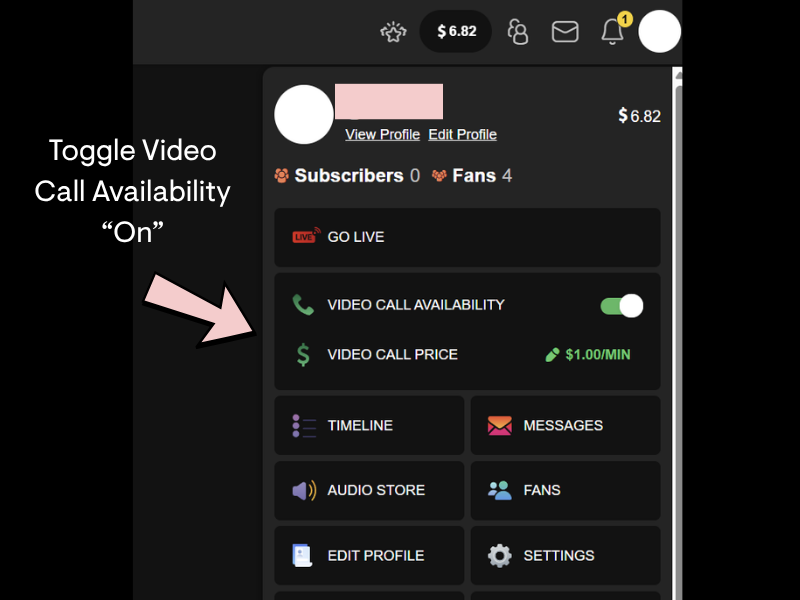
Log in to your Playboy Club Creator account and click your profile picture in the upper right hand corner. Find the Video Call Availability section and switch the toggle to On.
When this is turned on, fans can see that you are available for calls. If you do not want to receive incoming calls, switch it off.
Creator tip: Turn this on when you are actually ready to take calls. If you are doing your makeup, making coffee, texting three people back, and are “almost ready,” maybe wait five minutes so you don’t miss the notification!
Step 2: Set Your Video Call Price
Under Video Call Price, set your per-minute rate.
This is the amount fans will pay for a private call with you. Choose a price that feels worth your time, matches your audience, and reflects the experience you want to offer.
Creators may want to test different prices based on demand, availability, and fan response.
Step 3: Wait for Incoming Call Requests
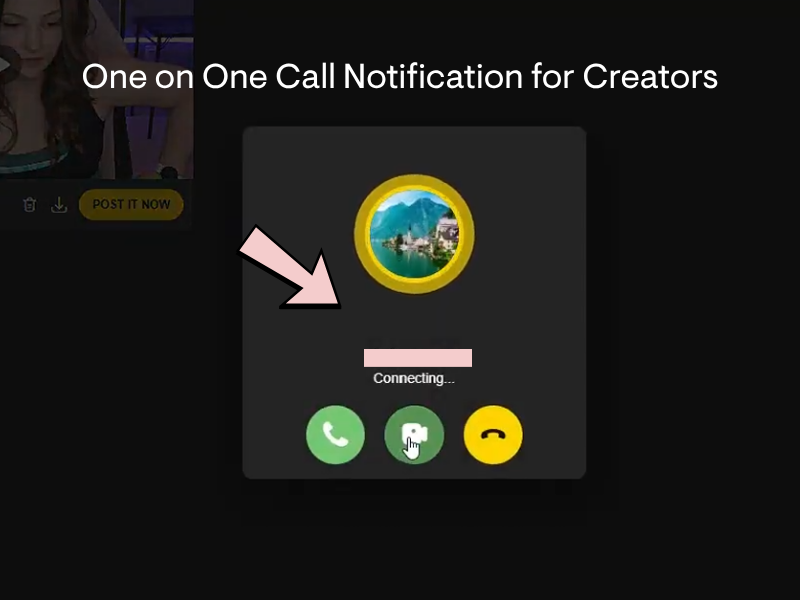
When a fan starts a call, you will receive a One on One Call notification. If you think you are not receiving call notifications, ensure you have “Push Notifications” enabled in your settings.
From the incoming call screen, you can choose how to respond:
- Accept the call as audio only
- Accept the call with video
- Decline the call
Step 4: Use Full Screen or Minimized Call View
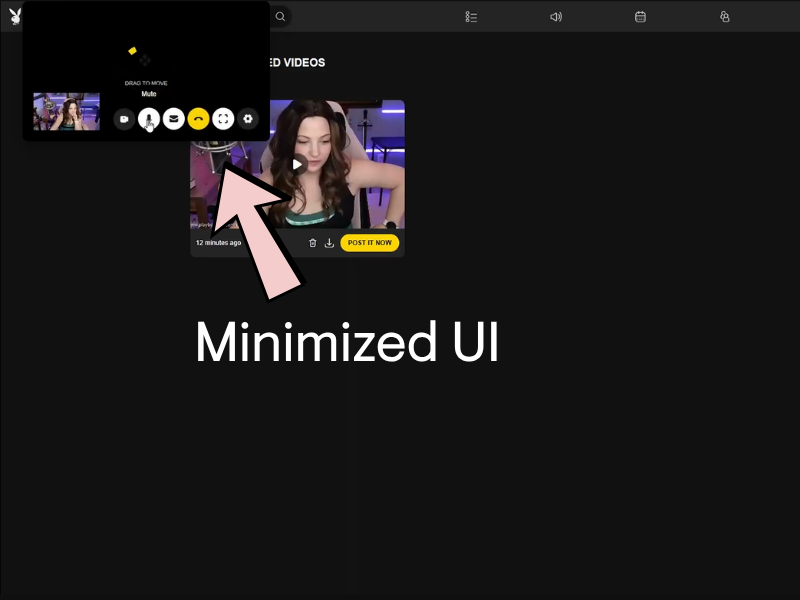
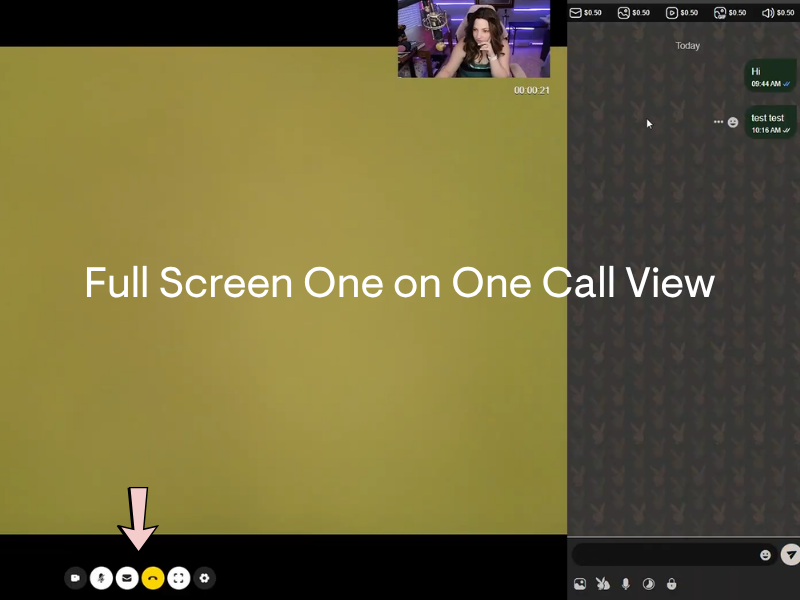
Once you are in a call, you can use the full screen One on One Call view or minimize the call UI.
The minimized view lets you keep the call active while navigating other parts of the platform. The full screen view gives you a focused call experience. A one on one call WILL NOT direct you to another site or platform.
Important: One on One Call Safety
A real Playboy Club One on One Call will happen directly on PlayboyClub.com.
A One on One Call will not direct you to another site, app, payment page, or external platform. You should not have to click an outside link to accept, start, or continue a call.
Playboy Club will not contact Creators about One on One Calls through DMs, whispers, or off-platform messages. Official support will come through approved Playboy Club support channels, not through random accounts claiming to be staff, moderators, fans, or “call verification” agents.
To help protect your account and earnings:
- Do not click links sent by fans claiming they are for One on One Calls
- Do not enter your login information anywhere outside PlayboyClub.com
- Do not send personal information, payment details, or verification codes to anyone
- Do not move call payments off-platform
- Do not trust messages claiming you need to “activate,” “verify,” or “unlock” calls through a third-party link
- Block and report anyone who pressures you to leave Playboy Club for a call
If something feels suspicious, do not engage. Stay on-platform, use the official One on One Call tools, and contact support directly if you need help.
Start Using One on One Calls on Playboy Club
One on One Calls give fans a more personal way to connect with their favorite Creators, and give Creators another way to earn from real-time interactions.
Creators can turn availability on whenever they are ready, set their per-minute price, and accept calls directly on PlayboyClub.com. Fans can browse available Creators, review the price before starting, and connect privately inside the platform.
Keep it simple: stay on-platform, use the official call tools, and only start or accept calls directly through Playboy Club.
Frequently Asked Questions About One on One Calls on Playboy Club
What are One on One Calls on Playboy Club?
- One on One Calls are private video calls between a Playboy Club Creator and a fan. Calls happen directly on PlayboyClub.com and are charged by the minute based on the Creator’s set call price.
Can Creators start One on One Calls with fans?
- No. Creators cannot initiate One on One Calls with fans. Fans start the call from a Creator’s profile or from the Calls page when the Creator has Video Call Availability turned on.
How do fans start a One on One Call?
- Fans can start a One on One Call by visiting a Creator’s profile and selecting Call Me, or by browsing available Creators on the Calls page. Before the call begins, the fan will see the Creator’s per-minute price and must select Agree & Start.
How do Creators turn on One on One Calls?
- Creators can turn on One on One Calls by logging into their Playboy Club account, clicking their profile picture, finding Video Call Availability, and switching the toggle to On.
How do Creators set their One on One Call price?
- Creators can set their per-minute price in the Video Call Price section of their Creator dashboard. Fans will see this price before agreeing to start the call.
What happens if a fan’s wallet balance runs low during a call?
- Fans will receive a notification before their funds run out so they can add more funds to their wallet if they want to continue the call.
Can a One on One Call happen outside Playboy Club?
- No. A real Playboy Club One on One Call will happen directly on PlayboyClub.com. A call will never require you to click an outside link, visit another platform, or send payment off-site.
Will Playboy Club contact Creators about calls through DMs or whispers?
- No. Playboy Club will not contact Creators about One on One Calls through DMs, whispers, or off-platform messages. Do not trust anyone claiming you need to verify, activate, or unlock calls through an outside link.
What should Creators do if someone sends a suspicious call link?
- Do not click the link. Do not enter your login information. Block and report the account, and contact official Playboy Club support if you need help.