

We have introduced new advanced options for Playboy Club paid posts. You can now charge subscribed fans to unlock individual timeline posts! The new Access & Pricing settings give you control over what public non-followers, followers, and subscribers pay to see your content
Previously, subscribers automatically unlocked your timeline posts as part of their subscription and you could add a non-subscriber pay-to-unlock price. Now, you can set an additional price for exclusive photos and videos, offering premium content alongside your regular subscriber posts. You can also differentiate pricing between non-followers, followers, and subscribers to fully customize your content strategy.
How to Create a Playboy Club Paid Post
- Create your post: Open Create Timeline Post, add a title and description, and upload your photos or video. Photos and videos must be uploaded as separate posts; you cannot mix both media types in one post.
- Choose your audience: Under “Who can see this post,” select Public, Followers, or Subscribers.
- Public allows anyone who visits your Playboy Club profile to have the option to unlock your post, whether or not they are following.
- Followers requires fans to be following you before they can unlock your post.
- Subscribers requires fans to be subscribed before they can unlock your post.
- Set your prices: Under “Access & Pricing”, turn on Charge for each eligible audience you want to charge. Enter your chosen price, or leave Charge switched off to give that audience free access.
- Publish: Review your settings and select Post.
Understanding Your Access and Pricing Options
Public: Different Prices for Different Fans
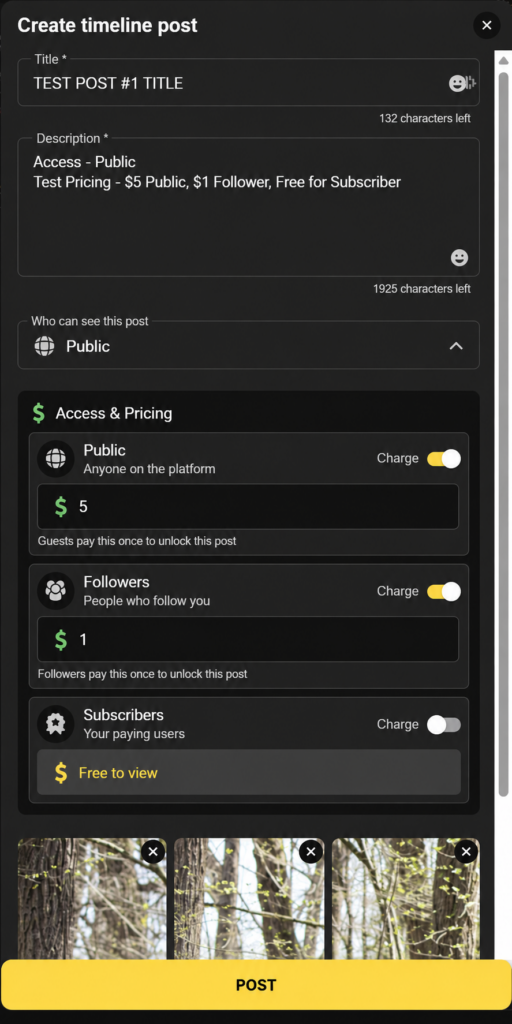
Public posts let you choose separate prices for non-followers, followers, and subscribers. You can offer free access to any of these groups.
For example:
- Public: $5
- Followers: $1
- Subscribers: Free
Consider offering followers a lower unlock price to encourage new fans to follow you, and reward subscribers with an even bigger discount or free access as an added subscription perk.
Followers: Reward Your Followers
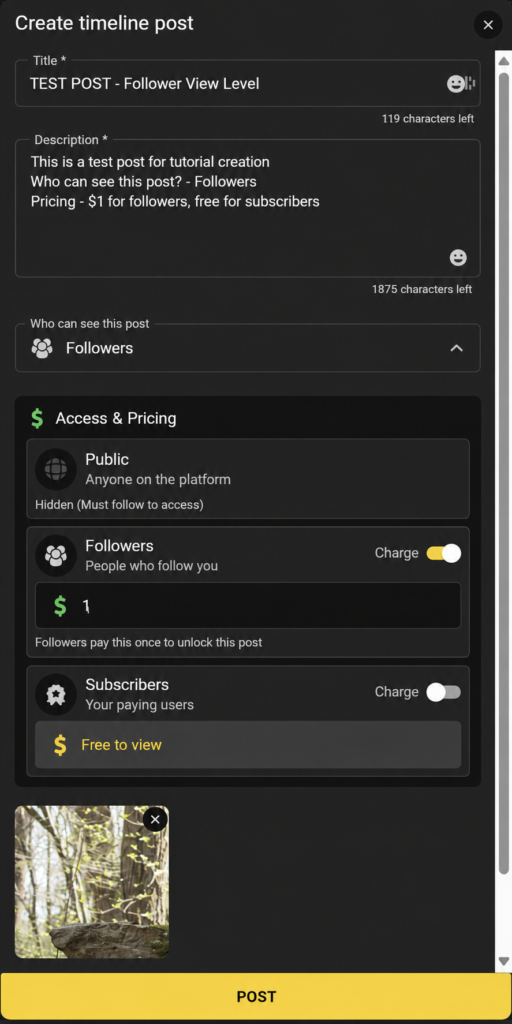
Choose Followers to restrict access to people who follow or subscribe to you. Once again, you can set separate prices for each group, but you will not be able to set a “Public” price.
For example:
- Public: Must follow you to be able to unlock the post
- Followers: $1
- Subscribers: Free
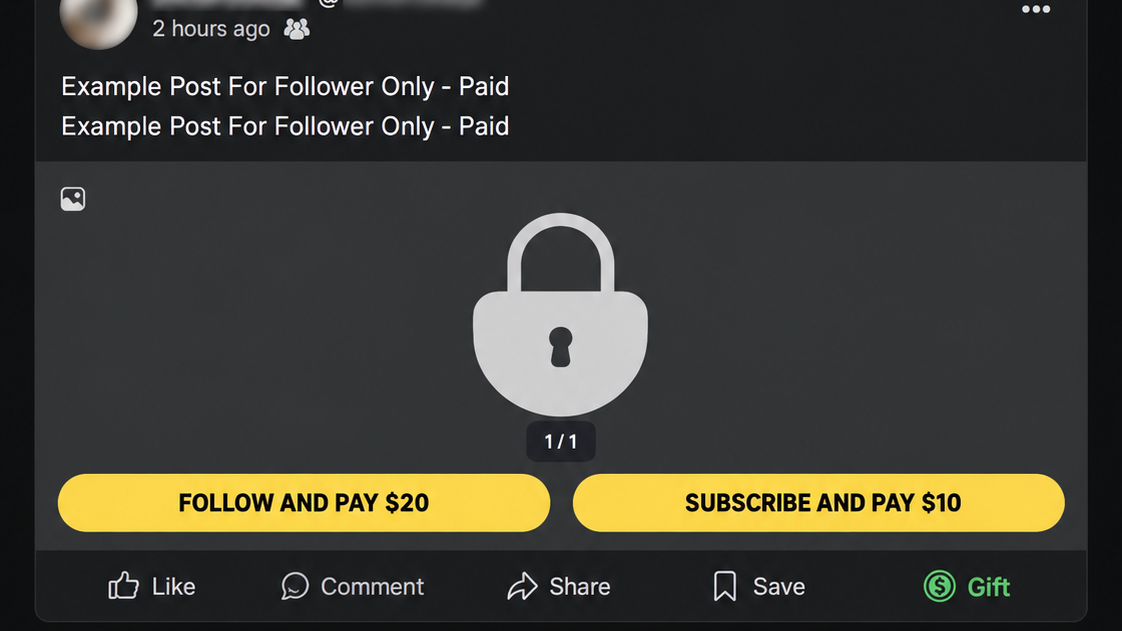
When these settings are used, fans will be prompted to follow or subscribe before they can pay to unlock your post.
Subscribers: Offer Exclusive Paid Content
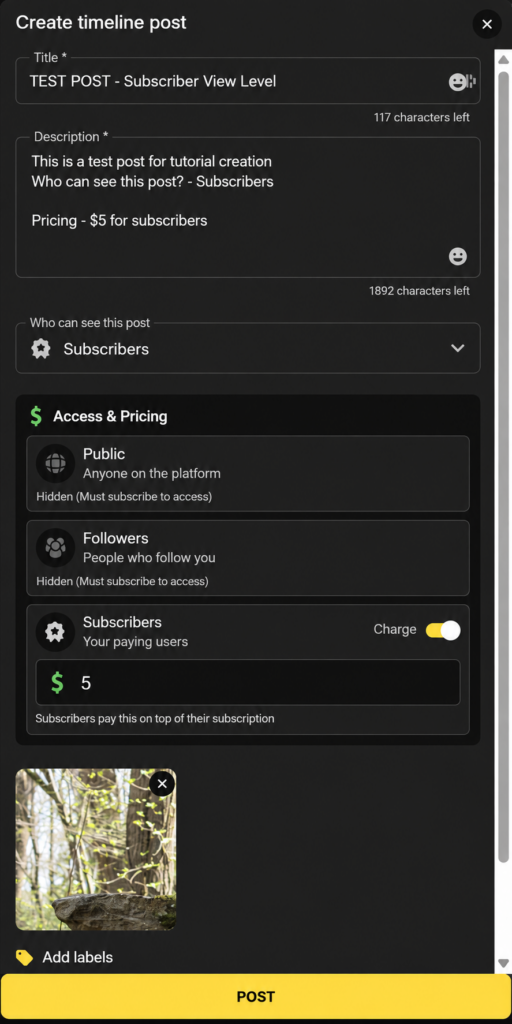
Choose Subscribers to make a post available only to paying subscribers. This means that non-followers and followers will be unable to pay to unlock this post, they will have to subscribe first. This is also how you can now charge an additional unlock price on top of their existing subscription.
For example:
- Public: Must subscribe to you to be able to unlock this post
- Followers: Must subscribe to you to be able to unlock this post
- Subscribers: $5
When these settings are used, fans will be prompted to subscribe before they can pay to unlock your post.
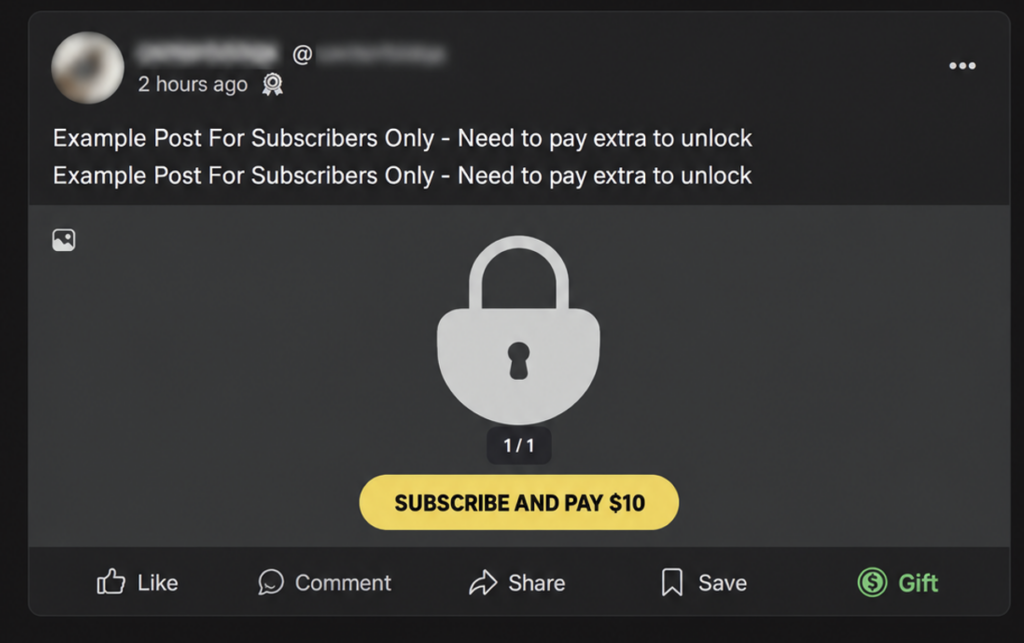
Previews: Important Differences Between Photos and Videos
Photo Posts
You cannot add a preview image to a paid photo post. Fans who haven’t purchased it will see locked content.
Our strong recommendation: Pair every paid photo post with a free teaser in a separate post.
Publish a single-image post that’s free to the public, either immediately before or after your paid post. Choose a SFW photo that gives potential buyers a sense of what they’ll be unlocking, and use your caption to promote the full paid post.
This is good practice for your entire profile. When a potential fan scrolls through your timeline, you want them to see your photos and get a sense of your content, rather than scrolling through a long line of locked posts.
Video Posts
Video posts offer four preview options. You can choose whichever works for your content.
- Upload a thumbnail: Manually select the image you want fans to see.
- No preview: Keep the video locked without displaying a preview.
- Upload a short video preview: Give fans a short clip of what they’ll be purchasing.
- Automatic preview: Let the system select preview frames from your video.
Important: Be careful with automatic previews.
The system selects random frames from throughout your video. If you don’t manually choose your thumbnail or video preview, it may reveal more than you intended, including content that should remain behind the paywall.
We recommend manually uploading your preview so you have control over what fans see before purchasing.
Make Your Subscriber Content Worth the Price
The ability to charge subscribers for individual posts gives you another way to earn, particularly when you have special photosets, longer videos, or other premium content to share.
However, subscribers are already paying for access to your profile. If you choose to charge them extra, make sure the additional content offers enough value to justify the purchase.
Continue publishing plenty of content that automatically unlocks as part of their subscription. Your regular subscriber posts should provide enough value that fans feel their recurring payment is worthwhile, even if they never purchase an additional paid post.
Best Practices for Paid Timeline Posts
- Keep your timeline interesting: Mix free public posts, regular subscriber content, and premium pay-to-unlock posts. New fans should be able to explore your profile without encountering nothing but locked content.
- Be mindful of your monetization strategy: Use your content and pricing to encourage visitors to follow you, and give followers a reason to become paying subscribers.
- Give subscribers real value: Continue offering content included in their subscription. Reserve additional unlock prices for content that warrants an extra purchase.
- Pair paid posts with free teasers: Paid photo posts don’t support previews, so we strongly recommend publishing a free, public single-image teaser before or after each paid photoset. Give fans a look at what they’re purchasing, and direct them to the paid post in your caption.
- Control your video previews: Manually upload thumbnails or short preview clips, especially when your video includes explicit content.
- Experiment with different prices: Offer followers and subscribers different pricing when appropriate, and see what your audience responds to.
- Write accurate descriptions: Tell fans what they’re purchasing, whether it’s a full photoset, an exclusive video, or behind-the-scenes content. Keep all explicit material behind the paywall.
You can still send pay-to-unlock Mass Messages as before. With these new timeline pricing options, you have more flexibility to sell individual posts, reward subscribers, and build a feed that encourages new fans to follow and subscribe.