

Learn How to Find Your OBS Stream Key on The Playboy Club, how to find your RTMP server link, plus how to connect them in OBS before going Live.
Going Live on Playboy Club gives Creators a direct way to connect with fans in real time. If you want more control over your stream setup, OBS lets you use an external camera, microphone, lighting setup, scenes, overlays, and a more polished broadcast layout.
To stream from OBS, you need two private pieces of information from Playboy Club:
- Your server, also called an RTMP link
- Your stream key
Think of the RTMP link as the address where your stream is sent, and your stream key as the private password that tells Playboy Club the stream belongs to you.
How to Find Your OBS Stream Key on The Playboy Club
To find your OBS stream key and RTMP server link:
- Log in to your Playboy Club Creator account.
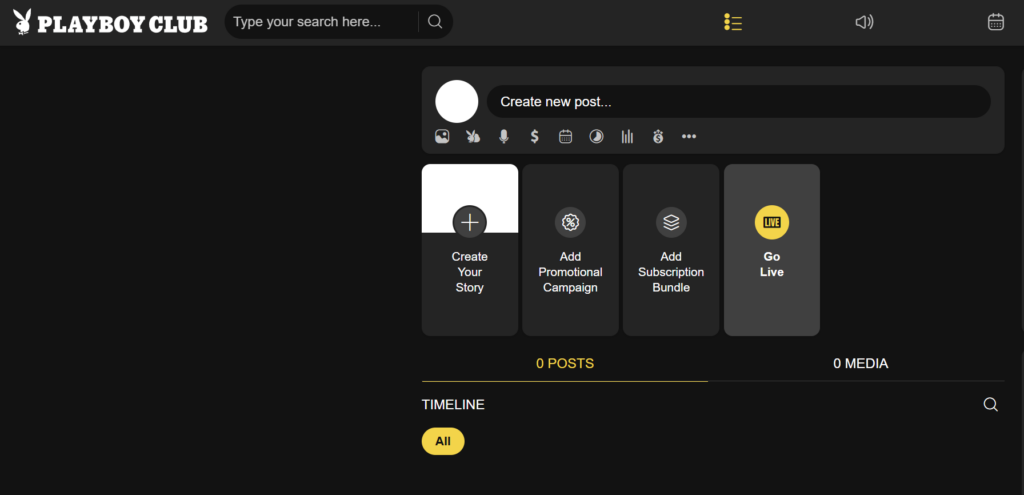
- Go to Start Your Live.
- Click the camera icon.
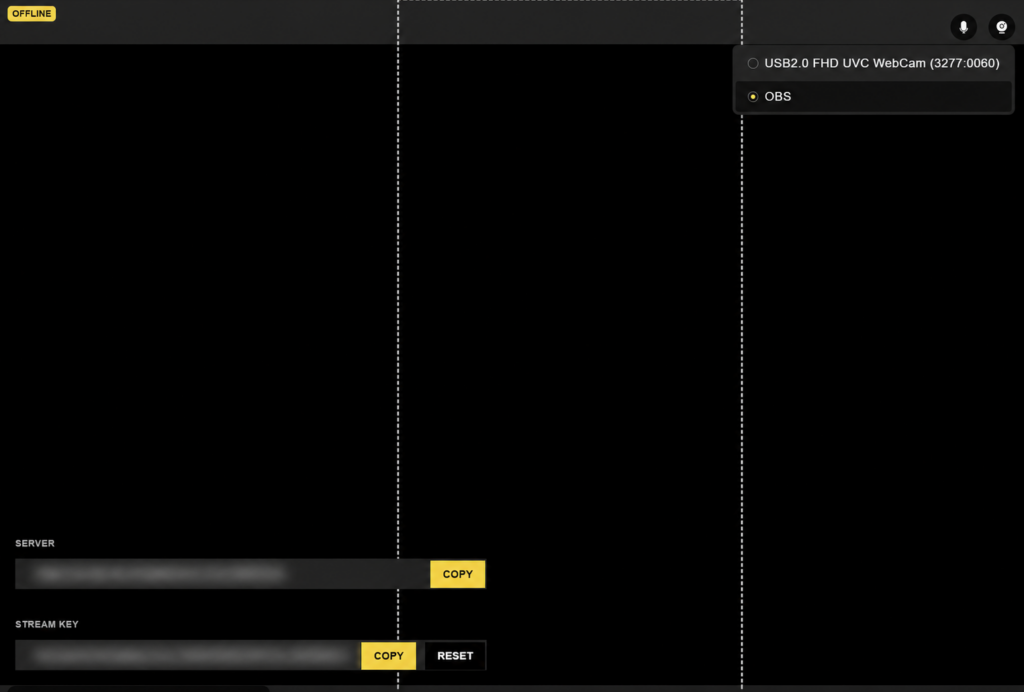
- Select OBS.
- Look in the bottom left of the Live setup screen.
- Your server, or RTMP link, will appear there.
- Your stream key will appear directly below it.
- Copy both into OBS before starting your stream.
Your stream key is private. Do not share it with anyone who should not be involved in managing your Lives, including fans, other Creators, or anyone claiming they “just need it for setup.” If you think your stream key has been seen, copied, or compromised, click Reset and use the new key.
What Is an RTMP Link?
RTMP stands for Real-Time Messaging Protocol. In plain terms, it is a standard way to send live video and audio from streaming software, like OBS, to a streaming platform.
When you use OBS with The Playboy Club, OBS sends your camera, microphone, and scene setup to The Playboy Club through the RTMP server. The RTMP server link tells OBS where to send the stream. The stream key tells The Playboy Club which Creator account the stream belongs to.
Most streaming platforms use this same basic setup: a server URL plus a stream key.
How to Add Your Playboy Club Stream Key to OBS
Once you have copied your server link and stream key from The Playboy Club, open OBS.
- Open OBS Studio.
- Click Settings.
- Click Stream.
- Under Service, choose Custom or Custom Streaming Server.
- Paste your Playboy Club server / RTMP link into the Server field.
- Paste your Playboy Club stream key into the Stream Key field.
- Click Apply.
- Click OK.
- Set up your camera, microphone, and scene in OBS.
- When you are ready, click Start Streaming in OBS.
Once OBS starts sending your stream, return to The Playboy Club and make sure your Live preview is working before you fully begin.
What Is OBS?
OBS Studio is free streaming software that lets you control what your audience sees and hears during a Live. It is commonly used for livestreaming because it gives Creators more control than a basic webcam setup.
With OBS, you can set up:
- A webcam or external camera
- A microphone
- Multiple scenes
- Backgrounds
- Overlays
- Better audio controls
- A more polished Live layout
You do not need an advanced studio setup to use OBS. A clean camera angle, strong lighting, clear audio, and a stable internet connection matter more than complicated overlays or dramatic transitions.
Recommended OBS Settings for Playboy Club Lives
Your best settings may depend on your computer, camera, and internet connection, but these are good starting points for many Creators:
- Resolution: 720p or 1080p
- Frame rate: 30 FPS
- Video encoder: H.264
- Audio codec: AAC
- Bitrate: Start around 3,500 kbps for 720p or 5,000 kbps for 1080p
If your internet connection is not stable, lower your bitrate before you go Live. A slightly lower-quality stream that stays connected is usually better than a high-quality stream that freezes every few seconds. Your upload speed matters most for livestreaming. As a general rule, avoid using all of your available upload bandwidth for your stream. Leave room for your internet connection to breathe, especially if other people in your home are also online.
Keep Your Stream Key Private
Your stream key is basically the private access code for your Live connection. Anyone who has your RTMP link and stream key may be able to send a stream to your account, so treat it like a password.
Best practices:
- Do not screenshot or share your stream key.
- Do not send it in DMs, email, or group chats.
- Do not paste it into public forums or support threads.
- Do not let fans “help” you set up your Live using your stream key.
- Reset your stream key if you think anyone else has seen it.
If your stream key has been compromised, go back to the OBS setup screen on The Playboy Club and click Reset. Then copy the new stream key into OBS before your next Live.
Troubleshooting: OBS Is Not Connecting to The Playboy Club
If OBS does not connect, check these first:
- Make sure you selected OBS from the camera icon in The Playboy Club.
- Make sure the RTMP server link is pasted into the Server field in OBS.
- Make sure the stream key is pasted into the Stream Key field in OBS.
- Remove extra spaces before or after the RTMP link or stream key.
- Confirm your internet connection is stable.
- Lower your bitrate if your stream keeps dropping.
- Restart OBS and try again.
- Reset your stream key if you are not sure whether the key is current.
FAQ: Playboy Club OBS Stream Key
Where do I find my OBS stream key on The Playboy Club?
- Go to Start Your Live, click the camera icon, and select OBS. Your server link and stream key will appear in the bottom left of the Live setup screen.
What is the server link?
- The server link is the RTMP URL. It tells OBS where to send your Live stream.
What is a stream key?
- Your stream key is the private code that connects your OBS stream to your Playboy Club Creator account.
Can I share my stream key with someone helping me set up OBS?
- No. Your stream key should stay private. If you need help, share screenshots with the stream key hidden or blurred.
What should I do if I shared my stream key by accident?
- Reset it immediately. Once you reset your stream key, use the new key in OBS before your next Live.
Do I need OBS to go Live on The Playboy Club?
- No. OBS is an option for Creators who want more control over their stream setup. You can still go Live using the standard camera option.
Why should I use OBS for Playboy Club Lives?
- OBS gives you more control over your camera, audio, layout, and overall stream quality. It can help your Live feel more polished, especially if you stream often or want a more produced setup.