

Playboy Club Gift Menu Guide
The Playboy Club Gift Menu allows creators to customize rewards and interactions during their Lives, making it easier for fans to participate through gifts while watching a stream. You can build your Gift Menu before going Live, edit it at any time, and your changes are automatically saved for future streams.
This guide explains how to:
- Set up your Playboy Club Gift Menu
- Edit your Gift Menu before or during a Live
- Choose gift prices
- Save your Gift Menu
- Encourage more fan participation during Lives
Whether you’re creating your first Gift Menu or refreshing an existing one, this guide walks you through how to set up your Gift Menu, edit your items and prices, and use it to create a more interactive Live experience. Find all written Playboy Club tutorials here.
How to use the Playboy Club Gift Menu
Either from your timeline or from your profile picture dropdown in the upper righthand part of the Playboy Club, Click “Go Live”.
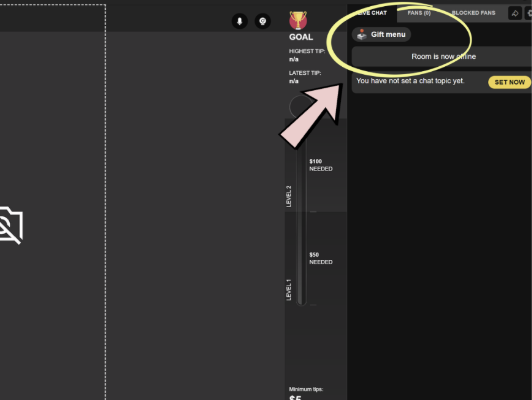
From the Live interface, click “Gift Menu” in the top right of your screen, above the chat box.
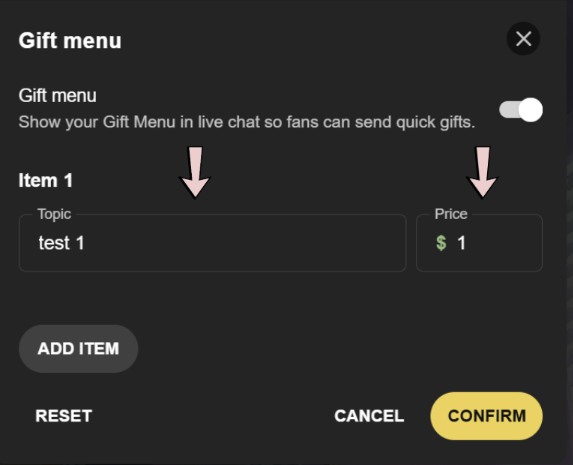
Once you have this open, add your gifts menu items and prices.
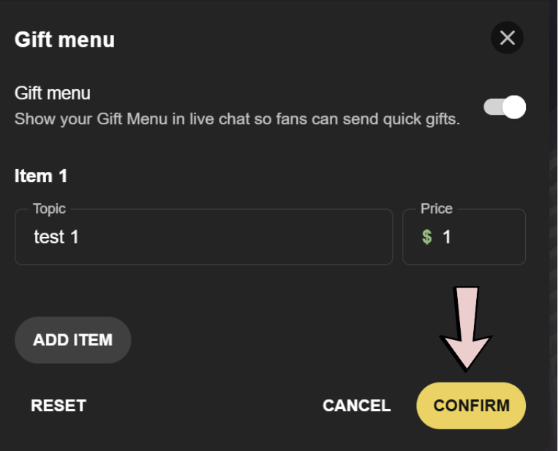
Click “Confirm” to set your gift menu – this will be grayed out if any of your Gift Menu items are incomplete.
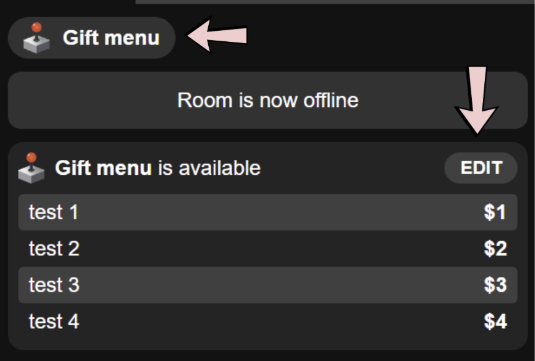
You can edit your Gift Menu at any time by clicking “Gift Menu” or “Edit”.
A few helpful notes:
- You do not need to be Live to set up and edit your Gift Menu
- Your Gift Menu is automatically saved, even if you exit the Live window before going live
Final Tips for Success
Your Gift Menu works best when it feels fun, clear, and personal to your audience. The most successful creators regularly reference their menu during their Lives, encourage interaction, and keep a mix of smaller and larger gift options available for different fan budgets.
Don’t be afraid to experiment and update your menu over time. Try different ideas, reactions, games, requests, or rewards to see what your audience responds to most.
Most importantly: promote your upcoming Lives ahead of time across your social media and through mass messages so your audience knows when to tune in. The more active and engaged your Live is, the more opportunities you create for gifts and stronger fan relationships.
Frequently Asked Questions
What is the Playboy Club Gift Menu?
- The Gift Menu is a customizable list of rewards, requests, reactions, or interactions that fans can purchase during your Playboy Club Live by sending gifts.
Can I set up my Gift Menu before going Live?
- Yes. You can create and edit your Gift Menu before your Live begins. Your menu is automatically saved, so you don’t need to rebuild it each time you stream.
Can I edit my Gift Menu during a Live?
- Yes. You can open the Gift Menu at any time during your Live to edit items, prices, or descriptions.
Does my Gift Menu save automatically?
- Yes. Your Gift Menu is automatically saved, even if you close the Live window before starting your stream.
How many Gift Menu items should I have?
- A balanced Gift Menu with several lower-priced options and a few premium interactions typically gives fans more ways to participate throughout your Live.
How do I get more gifts during my Lives?
- The most successful creators regularly mention their Gift Menu throughout their Live, remind viewers what different gifts unlock, promote upcoming Lives on social media, and offer options at multiple price points so everyone can participate.
2 Comments
Comments are closed.