


Learning how to go Live on the Playboy Club starts with understanding the different Live options and choosing the format that fits what you want to do that day. You can go Live publicly, limit access to followers or subscribers, work toward a paid Goal Show, or move from an active show into a Private Live with one fan. Playboy Club also offers One on One Calls, which are separate from Lives entirely. Whether you’ve hosted dozens of Lives or you’re trying the feature for the first time, this guide covers how each option works, where SFW and NSFW content belongs, and a few ways to get more out of your time Live.
How to Start a Playboy Club Live
- Log in to your Creator account.
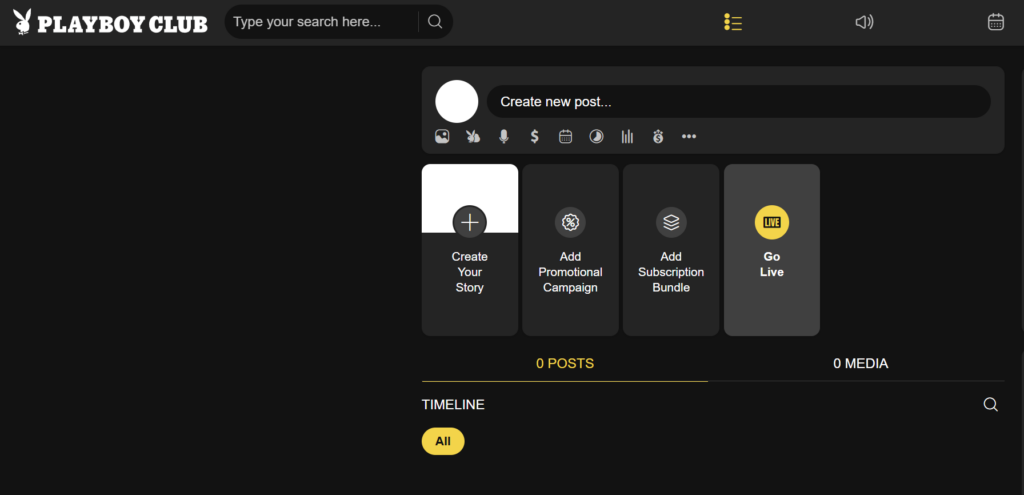
- Select Go Live from the timeline page or by tapping your profile picture.
- If needed, allow Playboy Club to access your camera and microphone.
- Choose your Live settings.
- Start your Live.
Before you start, check your lighting, sound, camera angle and background. You don’t need a complicated setup, but viewers should be able to see and hear you clearly.
Playboy Club Live Types
Public Lives
- A Public Live is open to everyone. Public Lives are useful for reaching a broad audience, chatting with fans, meeting new viewers and giving people a reason to follow or subscribe.
- Public Lives must remain SFW.
- You can still accept tips, use your Gift Menu, interact with chat and build toward another paid experience while you’re Public.
Followers Lives
- A Followers Live limits access to people who follow your Playboy Club profile. Followers Lives can give your existing audience something more personal while keeping access easy for fans who aren’t subscribers yet.
- Because following isn’t a paid access level, Followers Lives must remain SFW.
Subscriber Lives
- A Subscriber Live is limited to your paying subscribers. Because subscribers have paid for access, Subscriber Lives can include NSFW content.
- They don’t have to be NSFW. You can also use Subscriber Lives for longer hangouts, subscriber-only conversations, special themes or anything else you want to reserve for your paid audience.
Goal Shows
- Goal Shows let your viewers collectively work toward unlocking a paid Live. You can watch our full guide for Goal Shows inside the Club here.
When starting the Live, you can set:
- A total goal.
- A minimum tip amount required for access once the goal is reached.
The Live begins SFW while viewers tip toward your goal. Once the goal has been reached, you can lock the Live. Fans who have tipped at least the minimum amount can remain in or enter the locked show. Anyone new who wants to join after the lock will need to tip the required amount. Once the Goal Show is locked behind payment, it can include NSFW content within Playboy Club’s guidelines.
Private Lives
- A Private Live happens during an active Live. A fan can enter a private, paid-by-the-minute Live with you. While you’re in the Private Live, everyone remaining in your main Live sees a waiting screen until you return.
- When the Private Live ends, you return to the main show and continue where you left off.
- Private Lives give individual fans a more personal paid experience without requiring you to end your main Live.
One on One Calls Are Different From Lives
- One on One Calls are not a type of Live.
- Fans call you directly through Playboy Club when you’ve set yourself as available. You control your availability and per-minute price. When a fan requests a call, you can choose whether to accept or decline it. Creators don’t initiate these calls; the fan starts the request.
- One on One Calls can be especially useful before or after you’re Live, or whenever you want to make yourself available for individual conversations without hosting a full show.
- Our complete guide to using One on One Calls on Playboy Club explains availability, pricing, incoming requests and how the feature works in more detail.
Playboy Club Lives Are Solo

Playboy Club is a solo Creator platform. Your Lives should feature you. Do not plan shows around another person appearing on camera, and do not create boy-girl or other multi-person adult content. This applies regardless of which Live type you’re using. For the complete rules covering what can and can’t appear on Playboy Club, always refer to the Terms of Service and other guidelines before planning a show you’re unsure about.
SFW vs. NSFW Lives
The main rule is easy to remember:
SFW content can appear in open-access Lives. NSFW content must stay behind paid access.
SFW Lives
Keep these SFW:
- Public Lives
- Followers Lives
- The public portion of a Goal Show before it locks
Paid Lives
NSFW content may appear within eligible paid experiences, including:
- Subscriber Lives
- Locked Goal Shows
- Private Lives
- One on One Calls
All content still needs to follow the sites rules. A paywall changes where NSFW content can appear; it doesn’t override the platform’s content rules. When in doubt, check the guidelines before you go Live.
Going Live With OBS
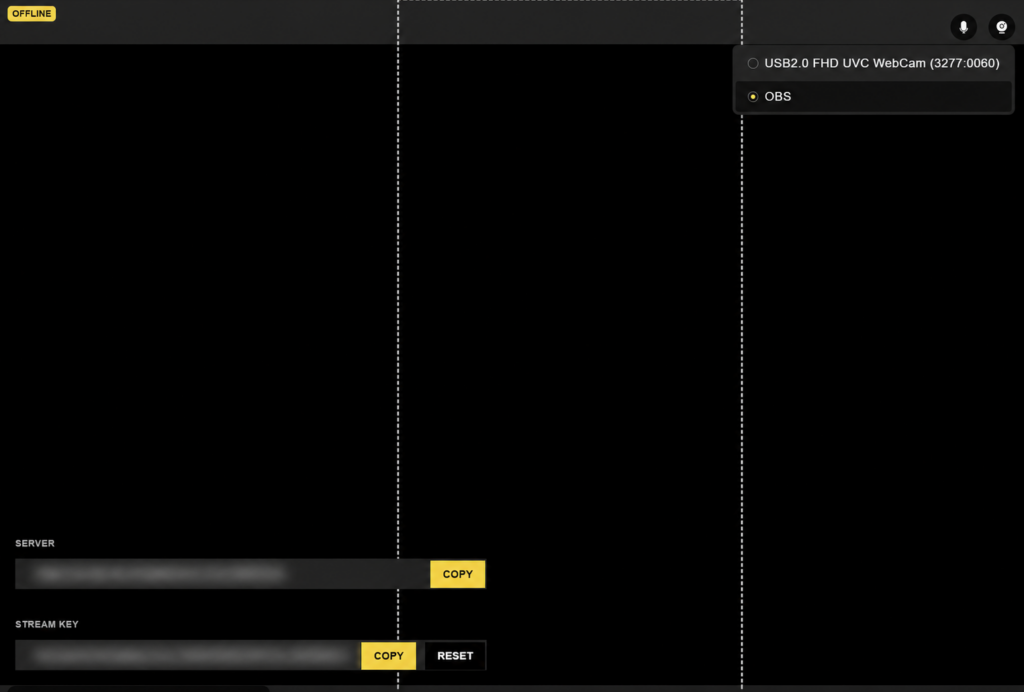
You can go Live directly from your device, or use OBS for a more advanced setup. OBS can be useful if you want greater control over your camera, microphone, scenes, layouts or other elements of your broadcast.
When setting up your Playboy Club Live, select OBS as your camera source. Your stream information will appear in the Live setup, including the stream key you need to connect Playboy Club with OBS. Keep your stream key private. Treat it like a password for your broadcast.
You can check out our full guide on finding your Playboy Club OBS stream key walks through where to find it and how to connect your OBS setup.
Create a Gift Menu
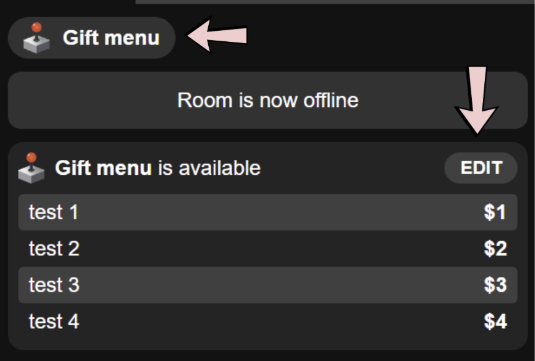
A good Live gives fans ways to participate. Your Gift Menu lets you create your own list of interactions or rewards and assign different gift prices to each one. Fans can then choose what they want to tip for while you’re Live.
Try including options at several price points rather than making every item a major purchase. Smaller gifts give more viewers an easy way to join in, while higher-priced options give your biggest fans something more exclusive.
Your menu can be edited and reused, so you don’t need to rebuild it every time you go Live.
Read our complete Playboy Club Gift Menu tutorial for info on creating items, choosing prices, editing your menu and using it during a Live.
Let Your Fans Know You’re Going Live
You don’t need a formally scheduled Live to give fans a heads-up. If you know you’re planning to go Live later, tell them.
You can:
- Make a free post announcing when you expect to be Live.
- Tell followers about your normal Live schedule if you have one.
- Send a Mass Message before you start.
- Send a Mass Message once you’re Live.
- Add a free teaser photo showing what you’re wearing or what you’re doing for the Live.
- Promote your Live on your existing social channels.
A message like “I’m Live right now” paired with a free teaser image can be a very effective reminder. Your fans already follow you because they want updates from you; make sure they actually know when there’s something happening.
How Often Should You Go Live?
Consistency helps because regular viewers learn when they’re likely to find you, but that doesn’t mean every Live needs to happen at exactly the same time every week. Going Live because you happen to feel like it can work too. Different times expose you to fans with different schedules, time zones and browsing habits. A Creator who only ever goes Live at one specific hour may repeatedly reach the same slice of her audience.
A good approach is to combine both:
- Build a few reliable Live habits your regulars can recognize.
- Add spontaneous Lives when you have time or feel like getting online.
- Test different days and hours.
- Pay attention to when you find new viewers and when your regulars tend to return.
Lives should fit your actual life well enough that you’ll keep doing them.
Advanced Live Tips

Once you’re comfortable with the basics, you can start using the rest of your social audience to build more traffic around your Playboy Club Lives.
Use Social Media as Your Pre-Show
Try going Live on one of your public social channels first. Keep that broadcast completely SFW. Chat with your audience, get ready for your Playboy Club show, answer questions or give them a preview of your plans. Then move the audience with you:
“I’m heading over to the Club for the rest of the show. Come find me there.”
End the public broadcast and continue on Playboy Club. This works especially well when the more exclusive part of your night is going to happen behind paid access.
Promote the Live Across Your Social Channels
You don’t need ten promotional posts for one Live.
A few well-timed reminders are enough:
- Earlier in the day: mention you’re planning to go Live.
- Shortly beforehand: post a SFW teaser.
- Once you’re Live: tell people it’s happening now and give them a direct path to your Playboy Club profile.
Instagram Stories are particularly useful because you can pair a visual teaser with a direct link. Don’t forget about X where a simple post can work just as well:
- Going Live on the Club tonight. Come say hi.
- I’m Live. You know where to find me.
Keep promotional content appropriate for whatever social platform you’re posting it on.
Advanced X Tip: Make Your Live Impossible to Miss
Creators comfortable with external broadcast tools can also experiment with X Live as a traffic driver.
Set up a SFW looping graphic or video in OBS to tell followers that your actual show is happening on Playboy Club:
- LIVE NOW
- I’m somewhere else 😉
- Find me on the Club
The purpose here is visibility: followers opening X may see that you’re broadcasting Live, while the visual sends them toward your Playboy Club show. Keep the X broadcast entirely SFW and follow X’s current Live and content policies. There’s no need to overproduce this, it’s functionally a digital sign pointing toward the actual party. Unless you have two computers available to you, we recommend sending to X from OBS on your computer and then going live from your phone on the Playboy Club.
Build a Live Routine That Works for You
There isn’t one perfect Playboy Club Live format. Some Creators may prefer long Public Lives built around conversation and tips. Others may focus on Subscriber Lives, Goal Shows or Private Lives. Some may use One on One Calls heavily without hosting Lives as often. Mix the tools based on your audience and what you’re comfortable offering.
At the basic level:
- Choose the right Live type.
- Know whether the show needs to remain SFW.
- Set up your Gift Menu.
- Let your audience know you’re going Live.
- Talk to the people who actually show up.
- Experiment with formats, times and paid options.
- Come back and do it again.
The more you use Lives, the easier it becomes to learn what your audience responds to and build a format that feels like yours.
Stay Playful 🖤